Customer support is one of the strongest use cases for LLM agents, but only a small fraction of real support work has actually been handed over to them because these agents fail in interesting ways in the real world. It's like teaching someone to swim in a nice pool and asking them to dive and do a rescue in a cave. We're bound to get surprises!
This is an attempt to recreate a real-world, a realistic cave for the LLMs to dive and learn the nuances. We take a B2B SaaS company, mock all the tools a support agent would use and use a masked version of their recent customer support data to see where the agents fail.
The Shallow Dive
The agent dives just deep enough to find a plausible answer, but not the root cause.
A good support investigation has two phases.
visible failure
What broke?
customer-specific mechanism
Why did it break for this customer, in this environment, at this time?
The agents are often good at the first part, but they stop there. They treat a possible symptom as if it were the root cause. The most interesting part is that they do "explore" and find the right answer in some cases, around 50% of them.
These tasks were inspired by real-world support tickets. The tasks were chosen such that the agents (primarily powered by frontier models) have pass@1 scores between 0.4 - 0.7. This makes this environment a very good candidate for RL rollouts.
Example
Customer request
Northstar Analytics admins are seeing slow API responses in the admin dashboard.
A failed run starts well. The agent opens Zendesk, finds the Northstar ticket, and identifies the affected surface as the admin dashboard. It then checks incident.io and finds an active latency incident. That looks relevant at first, but the incident updates show that it is scoped to a different region and product surface. So far, the agent is doing the right thing.
The task required one more step. The agent had to identify both the immediate symptom, a large export timing out behind the admin API, and the deeper reason it happened: a disabled async export path that forced the work through synchronous API workers. In the failed run, the agent correctly ruled out the active incident and found the timeout evidence in logs/errors. But it stopped there and opened the Answer Tool before checking the relevant feature/configuration state. As a result, it submitted only the partial answer instead of the full root-cause answer.
How to Measure the Dive?
The expected behavior of the agent is to write a reply to the customer. We need to evaluate how accurate and grounded that reply is. We tried LLM-as-a-judge, but for reasons mentioned in various research, it is horrible!
So we decided to take inspiration from competitive exams, primarily the ones conducted in India. In India, millions of students appear for each competitive exam, and it is very difficult for examiners to grade the answers manually. What they came up with was a very interesting approach. For non-verifiable subjects like history, etc., they give candidates some k number of choices, out of which m are correct. If a candidate chooses all the m correct options and none of the k-m options, then they get full score. Otherwise, they get a zero or negative score.
In our rubric, for every task, we generate multiple answer choices. The agent, after finishing its exploration, can call the Answer Tool, look at all the options, and decide which ones are right and which ones are wrong. The agent needs to choose all the correct options and none of the wrong options. Also, the agent cannot go back to the exploration phase after looking at the options. We instruct the agent clearly in the system prompt about this.
Options shown to the agent
Verifier answer key: A, B, D
It missed one correct option.
It chose wrong options.
Who is the best driver?
| Model | Pi | Codex | Claude Code |
|---|---|---|---|
| GPT 5.5 | 65.6% | 68.4% | — |
| Opus 4.8 | 58.8% | — | 64.2% |
| GLM 5.1 | 21.8% | — | — |
| Sarvam 105B | 1.5% | — | — |
All models were run with reasoning high wherever available.
Task Difficulty
Environment Design - The Cave
The environment is designed to look like a real technical support workspace.
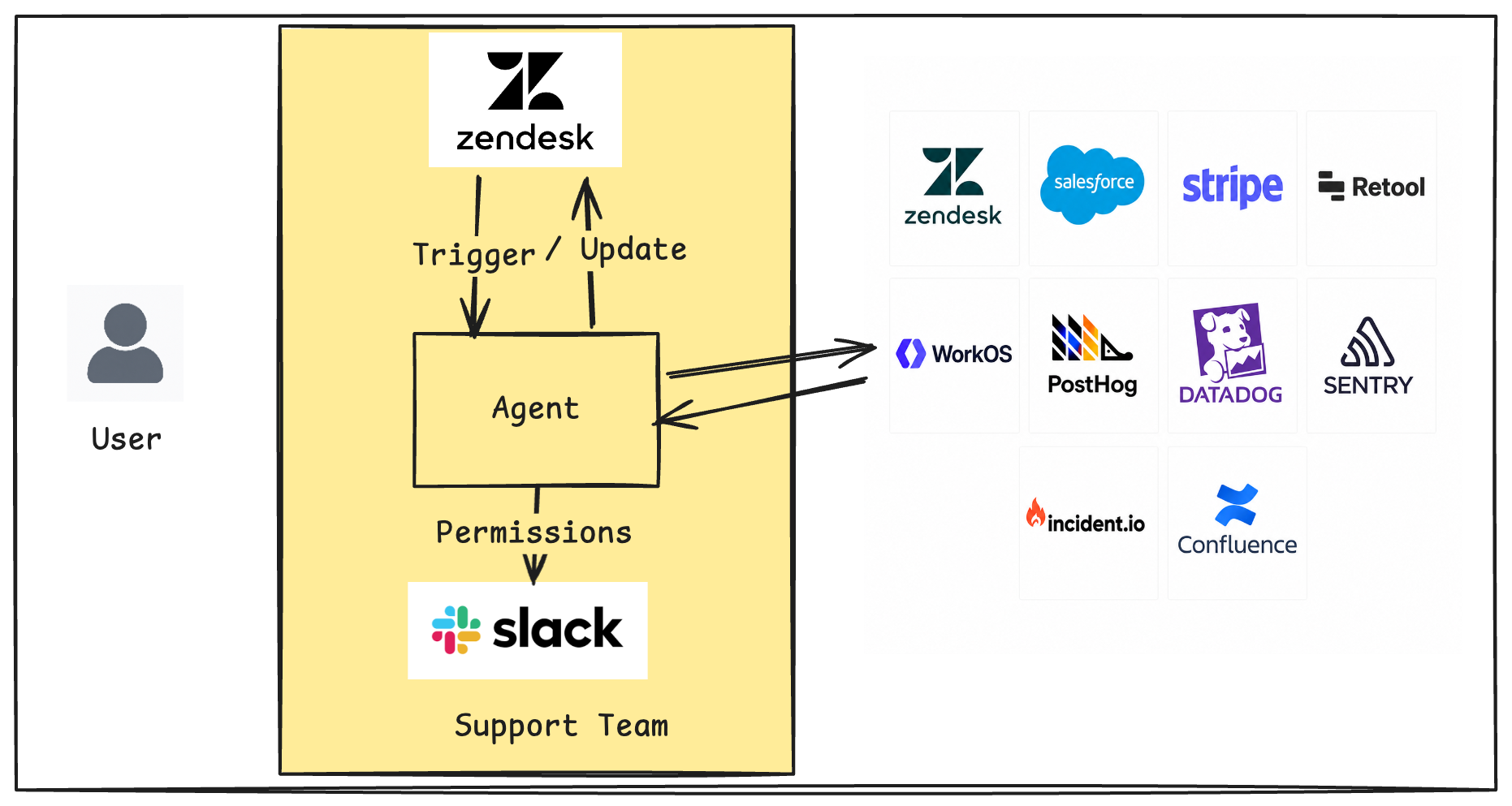
The agent has access to a normal coding-agent toolset: read, write, edit, and bash. It does not get a custom “Zendesk tool” or “Datadog tool”. Instead, it must use bash and curl to call local provider APIs over HTTP. The OpenAPI specs are available inside the agent container at /workspace/openapi-specs, so if it needs Datadog logs or PostHog feature flags, it has to inspect the relevant spec, discover the correct endpoint, and call it. For example, the agent may start with curl http://zendesk.local.mock:8080/api/v2/tickets. The benchmark therefore tests not just reasoning, but tool discovery and API use under uncertainty.
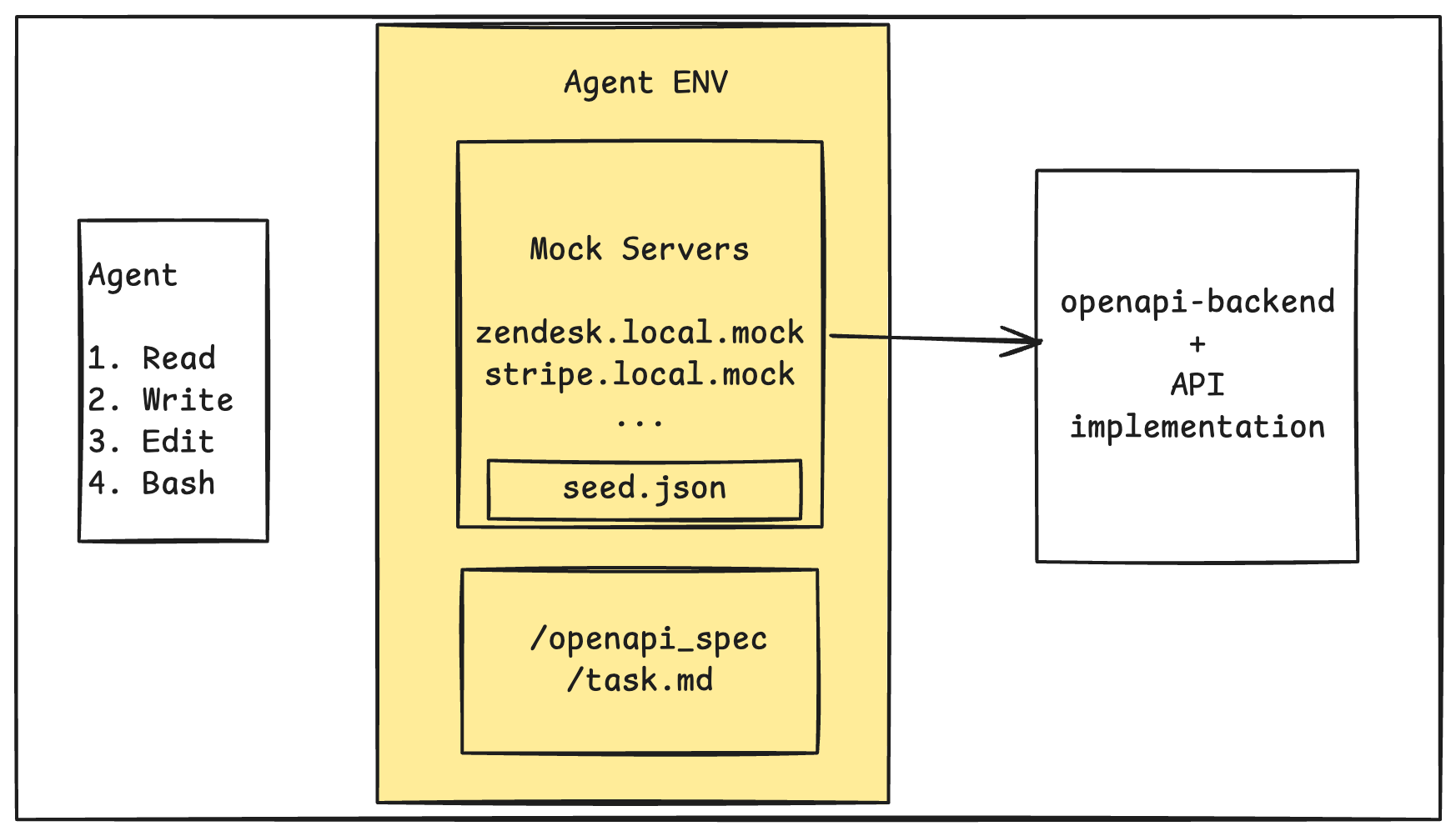
Behind this, the mock API server is a single Fastify process running on port 8080. It hosts all providers and routes requests by the HTTP Host header, so a Stripe request and a Zendesk request hit the same Node.js server. The server looks at the host, selects the provider, and routes the request through the corresponding OpenAPI backend.
The implementation has three layers: a host router that maps provider hosts such as zendesk.local.mock to provider configs; an OpenAPI runtime that validates and matches requests against real vendor OpenAPI specs using openapi-backend; and stateful handlers that implement realistic read/write behavior for selected endpoints using a task-specific JSON seed.
If an OpenAPI operation exists but has no custom handler, the server returns a deterministic OpenAPI-based mock response. If the path is invalid, it returns 404. Every task has its own seed file at task/<task-name>/seed.json. There is no global default seed. If the seed is missing, the task should be skipped.
Sandbox Isolation
Each task runs in a Daytona sandbox with two containers: main, where the agent runs, and mock-api, where the mock server and task seed live. The agent container has the OpenAPI specs at /workspace/openapi-specs, but it does not contain seed.json, the mock API server source, or MOCK_SEED_PATH. The agent can only access customer facts through HTTP APIs, which prevents the benchmark from turning into a file-reading task.
main container
Agent workspace- agent tools
/workspace/openapi-specs
No seed.json, server source, or MOCK_SEED_PATH.
mock-api container
Mock server + seed- task seed
- stateful handlers
- provider APIs
The Answer Tool
Each task ends with a deterministic Answer Tool. The agent calls GET /options to enter the final-answer phase and view the available choices; after that, all non-answer investigation APIs are locked. It then submits selected choices with POST /answer, and the verifier reads the submitted answer with GET /answer and compares it against the answer key using exact set equality.
/options
Show choices and lock investigation APIs.
/answer
Submit selected choices, e.g. {"choices":["A","C"]}.
/answer
Verifier reads the final submission.
The Tham Luang Cave
Thirteen boys were stuck in the Tham Luang cave for nine days. Nobody knew whether they were alive or dead, but human rescuers kept searching until they found them. It was a testament to human grit.
The cave was full of silt, stone, darkness, narrow passages, and currents flowing in every direction. The divers still had to navigate it carefully, keep their bearings, and go deep enough to find the people inside.
That is the kind of messiness we want in our RL environments. The real world is not a clean swimming pool. It is a cave, and it is unforgiving if you stop too early.